Custom Taxonomies in WordPress
When you own a restaurant, you know that, sooner or later, you need a good website to promote your business.

When you own a restaurant, you know that, sooner or later, you need a good website to promote your business. One of the most popular platforms for designing a website is WordPress, which provides lots of tools to organize and optimize your site. One of these useful resources WordPress offers is custom taxonomies, which allow you to create specific, structured ways to organize and classify your content.
So today, we’ll explore the power and flexibility that custom taxonomies in WordPress have and why you should apply them to your restaurant’s website.

What are Custom Taxonomies in WordPress?
In WordPress, content can be organized by grouping it into categories and tags, known as ‘taxonomies’. While categories and tags are built-in taxonomies, custom taxonomies allow you to go beyond these defaults to create more meaningful groupings.
Structuring your website by creating custom taxonomies will help visitors find your content more easily by providing more specific and relevant ways to navigate your site. For instance, if you run a movie review site, you might create custom taxonomies for genres, directors, or actors, to organize your reviews more precisely.
Categories vs Tags: Hierarchical vs Non-Hierarchical Taxonomies
A tag is a non-hierarchical keyword or term assigned to information.
On the other hand, categories are the classic way in which WordPress has been hierarchically categorizing information (having a main topic with its subtopics).
Custom Taxonomies in WordPress as Tags and Categories
Custom taxonomies can be non-hierarchical (e.g., “tag” type) or hierarchical (e.g., “category” type). They conveniently group elements together, both for maintenance and for your visitors. Furthermore, custom taxonomies can be set as public or private, making them extremely useful for internal grouping of items as well.
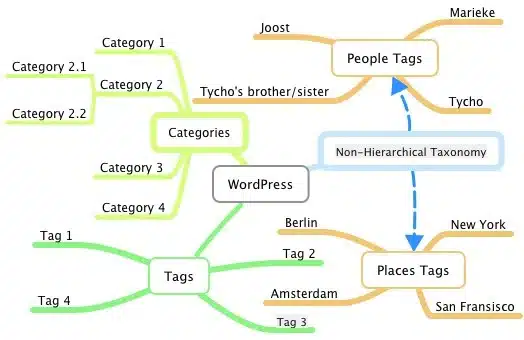
Examples of using Custom Taxonomies in:
- Blogs: For series, authors, or topics to better organize your posts.
- E-commerce: For product types, brands, or features to enhance product categorization.
- Portfolio Sites: For project types, clients, or skills to showcase your work in a more effective way.
Tips and Best Practices for Custom Taxonomies
- Use clear and descriptive names for your taxonomies to avoid confusion.
- Ensure your custom taxonomies add value and don’t duplicate existing categories or tags.
- Apply custom taxonomies consistently across your content to maintain a logical structure.
Benefits of Using Custom Taxonomies
As we mentioned before, custom taxonomies help you structure your content in a way that makes it easier for visitors to find related content. By grouping your content logically, you enhance navigation and usability, which ensures that the user can easily find what they’re looking for.
But, beyond that, well-organized content is more likely to be indexed by search engines (such as Google and Bing), and that will improve your site’s SEO.
How to Create Custom Taxonomies
- Manual Method: You can add custom taxonomies using code in your theme’s functions.php file.
- Using Plugins: Plugins like “Custom Post Type UI” simplify the creation of custom taxonomies without requiring code.
Leverage Custom Taxonomies in WordPress and Improve Your Resto Website
So, if you own a restaurant, you need a good website to promote it. And a good website has to provide users with a strong user experience.
By leveraging custom taxonomies, you can improve your content discoverability, enhance your website’s UX, and boost its SEO. Don’t hesitate to experiment with custom taxonomies in WordPress to find the best way to categorize your content and meet your specific needs. It’s definitely worthwhile!
Share this article
Keep reading
More from the journal.

Growth Marketing
·3 min read
The Operator’s Playbook: Bridging the Gap Between Restaurant Marketing and Kitchen Reality
Stop wasting ad spend on generic agencies. Discover Resto Experience, a data-driven restaurant marketing agency built by real operators to scale table volume.

Growth Marketing
·4 min read
How Restaurant Marketing Campaigns Actually Drive Growth
Stop juggling fragmented vendors. Learn how an integrated restaurant marketing system drives predictable, scalable revenue for multi-location brands.
Growth Marketing
·3 min read
Marketing System for Restaurants: The Resto Experience Approach
At Resto Experience, restaurant growth is not treated as a collection of disconnected tactics, it is built as a structured ecosystem.